
Building a simple RAG pipeline in 2026: a local-first approach
Code a simple RAG using ollama

I’m Subhan Hagverdiyev and welcome to Dataheimer - where we explore the atomic impact of data.
Just like splitting an atom releases enormous energy, the right data engineering decisions can transform entire organizations.
This is where I break down complex concepts and share all the fascinating discoveries from my journey.
Want to join the adventure? Here you go:
We hear these words quite often these days: RAG, LLM, vector databases and of course MCP servers(though we don’t need it for this article). If you are planning to take a path of AI software engineer or simply don’t want to fall behind in AI development you need to understand what is RAG and how it helps LLMs.
In this article we will build a functional RAG system from scratch using Python and Ollama to run high-performance models locally on your machine.
What is RAG?
I think we already know what is LLM. A chatbot (like ChatGPT or Claude) that understands and generates human language.An LLM is like a pre-compiled binary with no internet access. RAG is a process where you find a specific piece of text from your own data and "paste" it into the prompt you send to the LLM. This allows the LLM to answer questions using information it wasn't originally trained on.
A real-world example would be asking Claude “How much debt I have to the bank?”. Claude cannot answer this question because it doesn’t have access to external knowledge, such as your financial information.
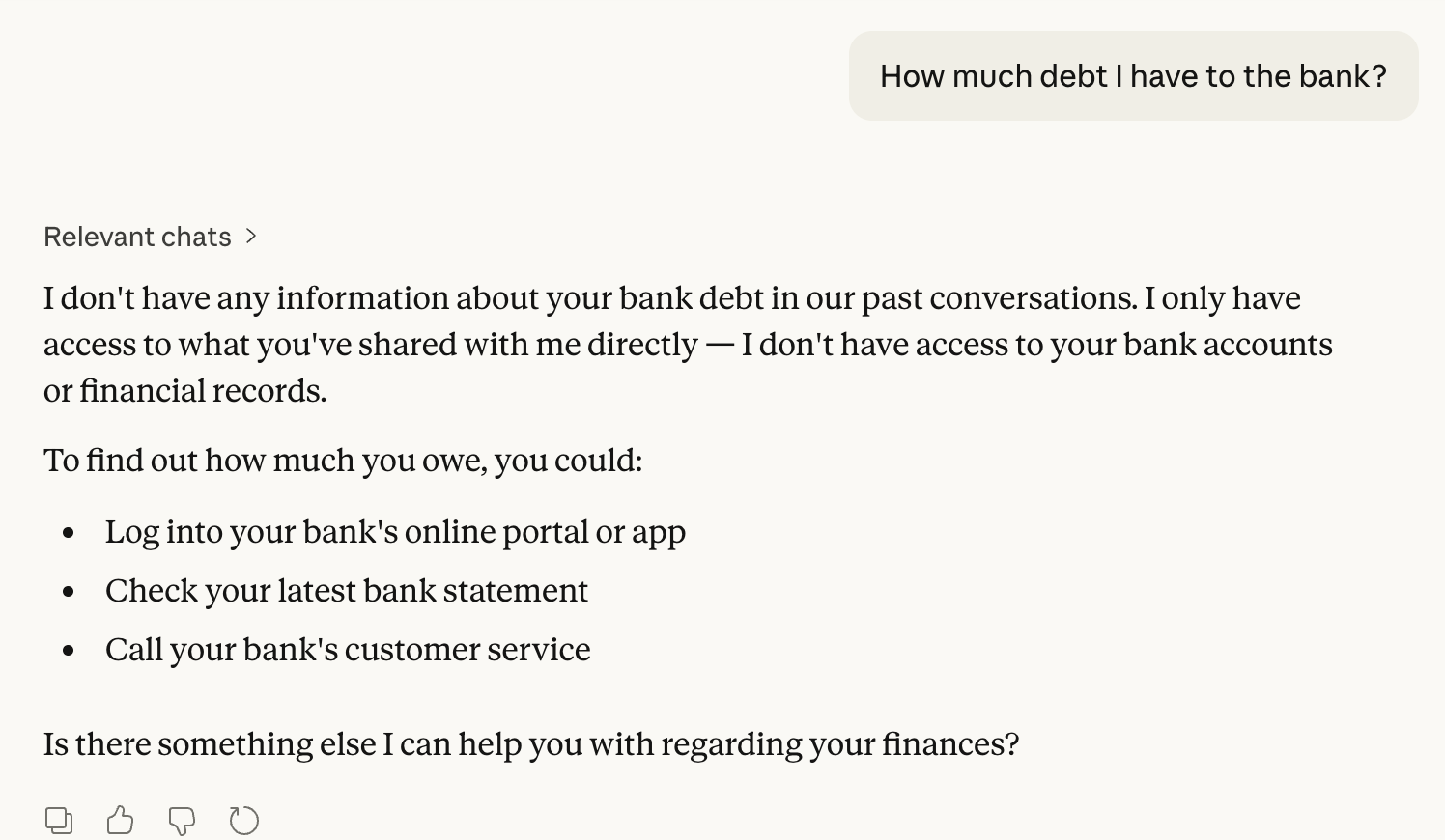
To address this limitation, we need to provide external knowledge to the model (in this example, a financial record)
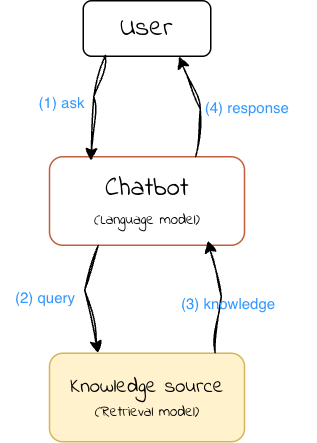
A RAG system consists of two key components:
A retrieval model that fetches relevant information from an external knowledge source, which could be a database, search engine, or any other information repository.
A language model that generates responses based on the retrieved knowledge
Let’s create a simple RAG system that retrieves information from a predefined dataset and generates responses based on the retrieved knowledge. The system will comprise the following components:
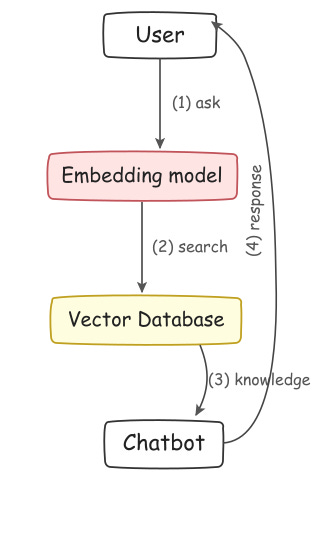
Embedding model: A pre-trained language model that converts input text into embeddings - vector representations that capture semantic meaning. These vectors will be used to search for relevant information in the dataset.
Vector database: A storage system for knowledge and its corresponding embedding vectors. While there are many vector database technologies like Qdrant, Pinecone, and pgvector, we’ll implement a simple in-memory database from scratch.
Chatbot: A language model that generates responses based on retrieved knowledge. This can be any language model, such as Llama, Gemma, or GPT.
Indexing phase
Before we can ask questions, we must "index" our data. This involves breaking documents into chunks and converting them into vectors.
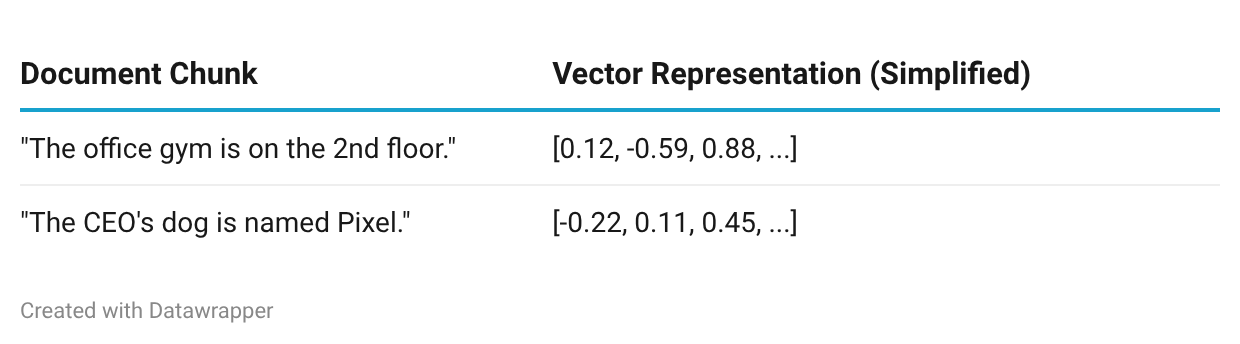
The embedding vectors can be later used to retrieve relevant information based on a given query. Think of it as SQL WHERE clause, but instead of querying by exact text matching, we can now query a set of chunks based on their vector representations.
Implementation
We will use Python to implement the RAG with Ollama because it allows us to run these models locally without API fees or privacy concerns.
Models we will use
Embedding model: https://ollama.com/library/nomic-embed-text
Language model: https://ollama.com/library/llama4:scout
And for the dataset, we’ll use a simple list of facts about cats. Each fact will be treated as a chunk during the indexing phase.
Install Ollama and pull models
Start by downloading Ollama from ollama.com.
ollama pull nomic-embed-text
ollama pull llama4:scout

```
If everything goes well, you'll see output like this:
```

pulling manifest
...
verifying sha256 digest
writing manifest
success
Next, install the Ollama Python package:
pip install ollamaLoad the dataset
Create a new Python script and load the dataset. The dataset is a plain text file where each line is a cat fact — each line becomes a chunk for indexing.
You can download the example dataset from here. Here’s how to load it:
dataset = []
with open('cat-facts.txt', 'r') as file:
    dataset = file.readlines()
    print(f'Loaded {len(dataset)} entries')
Build the vector database
import ollama

EMBEDDING_MODEL = 'nomic-embed-text'
LANGUAGE_MODEL = 'llama4:scout'

# Each element in VECTOR_DB is a tuple: (chunk, embedding)
# An embedding is a list of floats, e.g. [0.1, 0.04, -0.34, 0.21, ...]
VECTOR_DB = []

def add_chunk_to_database(chunk):
    embedding = ollama.embed(model=EMBEDDING_MODEL, input=chunk)['embeddings'][0]
    VECTOR_DB.append((chunk, embedding))
For simplicity, each line in the dataset is treated as its own chunk:
for i, chunk in enumerate(dataset):
    add_chunk_to_database(chunk)
    print(f'Added chunk {i+1}/{len(dataset)} to the database')
Implement the retrieval function
Next, we need a way to find the most relevant chunks for a given query. We’ll compute the cosine similarity between the query’s embedding and every chunk embedding in our database, then return the top matches.
Cosine similarity measures how “close” two vectors are in the embedding space — a higher value means the texts are more semantically similar.
def cosine_similarity(a, b):
    dot_product = sum([x * y for x, y in zip(a, b)])
    norm_a = sum([x ** 2 for x in a]) ** 0.5
    norm_b = sum([x ** 2 for x in b]) ** 0.5
    return dot_product / (norm_a * norm_b)
And the retrieval function:
def retrieve(query, top_n=3):
    query_embedding = ollama.embed(model=EMBEDDING_MODEL, input=query)['embeddings'][0]
    similarities = []
    for chunk, embedding in VECTOR_DB:
        similarity = cosine_similarity(query_embedding, embedding)
        similarities.append((chunk, similarity))
    # Sort descending — higher similarity = more relevant
    similarities.sort(key=lambda x: x[1], reverse=True)
    return similarities[:top_n]
Generate a response
Now comes the generation phase. We take the retrieved chunks, inject them into a prompt as context, and let the language model produce an answer grounded in that context.
input_query = input('Ask me a question: ')
retrieved_knowledge = retrieve(input_query)

print('Retrieved knowledge:')
for chunk, similarity in retrieved_knowledge:
    print(f' - (similarity: {similarity:.2f}) {chunk}')

instruction_prompt = f'''You are a helpful chatbot.
Use only the following pieces of context to answer the question. Don't make up any new information:
{'\n'.join([f' - {chunk}' for chunk, similarity in retrieved_knowledge])}
'''
Then pass it to Ollama for generation:
stream = ollama.chat(
    model=LANGUAGE_MODEL,
    messages=[
        {'role': 'system', 'content': instruction_prompt},
        {'role': 'user', 'content': input_query},
    ],
    stream=True,
)

print('Chatbot response:')
for chunk in stream:
    print(chunk['message']['content'], end='', flush=True)
Putting it all together
Save the complete code to a file called demo.py and run it using following command:
python demo.pyAsk me a question: tell me about cat speed
Retrieved chunks: ...
Chatbot response:
According to the given context, cats can travel at approximately 31 mph (49 km) over a short distance. This is their top speed.Improvements
This implementation is intentionally minimal. Here are some meaningful ways to improve it:
Smarter query construction. If the user’s question spans multiple topics, a single retrieval pass may miss important context. One approach is to have the language model rewrite or decompose the user’s question into multiple targeted queries before retrieval.
Reranking. The top-N results from cosine similarity aren’t always the most useful. A dedicated reranking model can re-score the retrieved chunks based on deeper relevance to the query, improving answer quality significantly.
Use a proper vector database. Our in-memory list won’t scale. For real applications, consider a purpose-built vector store like Qdrant, Pinecone, pgvector, or ChromaDB. These offer fast approximate nearest-neighbor search, persistence, and filtering.
Better chunking strategies. We’re treating each line as a chunk, which is simplistic. For longer documents, you’ll want to experiment with overlapping chunks, semantic chunking, or recursive splitting to capture more context per chunk.
Upgrade the language model. We used a relatively small model here for speed and simplicity. Larger models like Llama 4 Maverick, Qwen3, or DeepSeek V3 will produce more coherent and accurate responses, especially for complex questions.
Conclusion
RAG remains one of the most practical techniques for making language models useful with your own data. By building a simple RAG from scratch, we’ve walked through the core concepts: embedding text into vectors, retrieving relevant context via similarity search, and grounding generation in that context.
The ecosystem has matured substantially — running high-quality open models locally is now straightforward with tools like Ollama, and the range of available models and vector databases keeps growing. Whether you’re building a quick prototype or a production system, the fundamentals covered here are the foundation everything else builds on.
Thank you for reading this far. See you in my next articles. Don’t forget to subscribe to get more of this interesting data engineering content!”
This is really good! Distilled-down small enough for my small brain!
Thanks